Basic Queries
Source: https://www.sqlitetutorial.net
Query data from tables
General order
FROM table_list
  JOIN table ON join_condition
WHERE row_filter
ORDER BY column
LIMIT count OFFSET offset
GROUP BY column
HAVING group_filter;
Basic
Select all items from a table
SELECT * FROM tableA;
Select all items from a table column
SELECT columnA FROM tableA;
Select all items from several table columns
SELECT columnA, columnB FROM tableA;
Rename resulting column names
Renaming column names of resulting matches
SELECT columnA AS foo, columnB AS bar FROM tableA;
Define value for additional columns
Each row will receive the value ‘MyValue’ in column ’Type’
SELECT columnA, 'MyValue' AS Type FROM tableA;
No duplicates
Select items without duplicate values (single column) or combination (multiple columns)
SELECT DISTINCT columnA FROM tableA;
SELECT DISCTINCT columnA, columnB FROM tableA;
Order results by columnA primarily, secondarily by columnB
SELECT columnA, columnB FROM tableA ORDER BY columnA ASC, columnB ASC;
Order results by column ID (here: columnB = 2, columnC = 3)
SELECT columnA, columnB, columnC FROM tableA ORDER BY 2 ASC, 3 ASC;
Filter results
Basic syntax
SELECT column_list FROM table WHERE search_condition;
Comparison operators
Operator |
Meaning |
|---|---|
= |
Equal to |
<> or != |
Not equal to |
< |
Less than |
> |
Greater than |
<= |
Less than or equal to |
>= |
Greater than or equal to |
Logical operators
Operator |
Meaning |
|---|---|
AND |
returns 1 if both expressions are 1, and 0 if one of the expressions is 0. |
BETWEEN |
returns 1 if a value is within a range. |
EXISTS |
returns 1 if a subquery contains any rows. |
IN |
returns 1 if a value is in a list of values. |
LIKE |
returns 1 if a value matches a pattern |
NOT |
reverses the value of other operators such as NOT EXISTS, NOT IN, NOT BETWEEN, etc. |
OR |
returns true if either expression is 1 |
Single condition (value from column)
SELECT columnA FROM tableA WHERE columnA > 5000;
Multiple conditions
# must all be true
SELECT columnA, columnB FROM table WHERE columnA > 5000 AND columnB = 10;

# at least one must be true
SELECT columnA, columnB FROM table WHERE ANY columnA > 5000 AND columnB = 10;
# must all be true
SELECT columnA FROM table WHERE columnA LIKE ‘%foobar_’;
Hint
% |
matches zero or more characters |
_ |
matches a single character |
Search value that contains any of the wildcard characters (% or _)
(here: ‘' is used as escape character)
SELECT columnA FROM table WHERE columnA LIKE ’%50\%%’ ESCAPE ‘\’;
Search value containing a substring (GLOB) -> case-sensitive
SELECT columnA FROM table where columnA GLOB ‘?Man*’;
Hint
* |
matches zero or more characters |
? |
matches a single character |
Search if value within a range of allowed values
SELECT columnA FROM table WHERE columnA IN (10,20,30);
Search if value is between two values (value itself are included)
SELECT columnA FROM table WHERE columnA BETWEEN 1 AND 10;
Search if value is not between two values (values itself are not included
SELECT columnA FROM table WHERE columnA NOT BETWEEN 100 and 199;
Limit results
Limit the amount of rows to return (here: 10)
SELECT columnA FROM table LIMIT 10;
Limit with an offset (start at nth row of the results, here: 30)
SELECT columnA FROM table LIMIT 10 OFFSET 30;
Join data from multiple tables
Usually foreign keys are used in these conditions (here: someID), which exists in all joined tables.
Returns row only if condition matches (here: someID value exists for both a row in tableA and tableB) -> INNER JOIN
# regular
SELECT columnA, columnB FROM tableA INNER JOIN tableB ON tableB.sameID = tableA.someID;

# shortened via aliases
SELECT A.columnA, B.ColumnB FROM tableA A INNER JOIN tableB B ON A.someID = B.someID;

# shortened using USING
SELECT columnA, columnB FROM tableA INNER JOIN tableB USING(tableA.someID);

# 2+ tables
SELECT someID, tableA.columnA, tableB.columnB, tableC.columnC
FROM tableA
INNER JOIN tableB ON tableB.someID = tableA.someID
INNER JOIN tableC ON tableC.someID = tableB.someID;
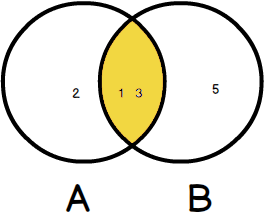
Inner Join
Adding additional condition(s)
SELECT columnA, columnB FROM tableA INNER JOIN tableB USING(tableA.someID) WHERE columnA < 10;
Returns any row, but uses NULL (here: for columnB value) if “right” table does not have a matching row -> LEFT JOIN
# regular
SELECT columnA, columnB FROM tableA LEFT JOIN tableB ON tableA.someID = tableB.someID;

# using USING
SELECT columnA, columnB FROM tableA LEFT JOIN tableB USING (tableA.someID);
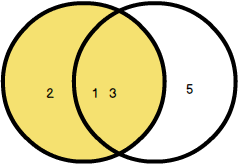
Left Join
Creates a Cartesian product of tables (i.e. all possible column combinations)
SELECT columnA FROM tableA CROSS JOIN tableB;
Join various columns of a table with itself
SELECT columnA1, colummA2 FROM tableA a1 INNER JOIN tableA a2 ON a1.someID = a2.anotherID;
Split result into group
Display count results as groups (one row per resulting group) while using an aggregate function (e.g. COUNT)
SELECT columnA, COUNT(someID) FROM tableA GROUP BY columnA;

# more real example (returns number of tracks per album)
SELECT albumid, COUNT(trackid) FROM tracks GROUP BY albumid;
Without the group by statement, all values for “notuniqueID” are just counted (which returns number of not NULL values for this column). The GROUP BY statement splits up this count to the various values in columnA
Combine with INNER JOIN
SELECT tableA.columnA1, columnA2, COUNT(someID)
FROM tableA
INNER JOIN tableB ON tableB.columnA1 = tableA.columnA1
GROUP BY tableA.columnA1;
Returns only results that have match on tableB. Please note that tableA.columnA1 must be specified after SELECT, since both tableA and tableB have this column.
MAX, MIN and AVG functions
SELECT tableA.columnA1, min(columnA2), max(columnA2), round(avg(columnA2),2)
FROM tableA
INNER JOIN tableB ON tableB.columnA1 = tableA.columnA1
GROUP BY tableA.columnA1;
Grouping by multiple columns (will create all combination values of columnA1 and columnA2 as groups)
SELECT columnA1, columnA2, count(someID) FROM tableA GROUP BY columnA1, columnA2;
Filter groups
The HAVING clause can only be applied to group results
Direct value
SELECT columnA, COUNT(someID) FROM tableA GROUP BY columnA HAVING columnA = 1;
Value range
SELECT columnA, COUNT(someID) FROM tableA GROUP BY columnA HAVING count(someID) BETWEEN 18 AND 20;
Combine multiple queries into single results
Combine two queries into one result (eliminating duplicates)
SELECT columnA FROM tableA UNION 18 AND SELECT columnB from tableB;
-> results from columnB are merged into columnA results (no duplicates)
Combine two queries into one result (including duplicates)
SELECT columnA FROM tableA UNION ALL 18 AND SELECT columnB from tableB;
-> results from columnB are merged into columnA results (including duplicates)
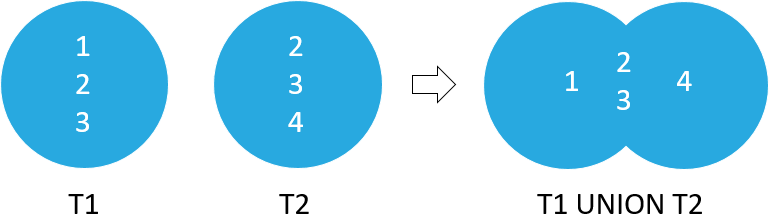
Union
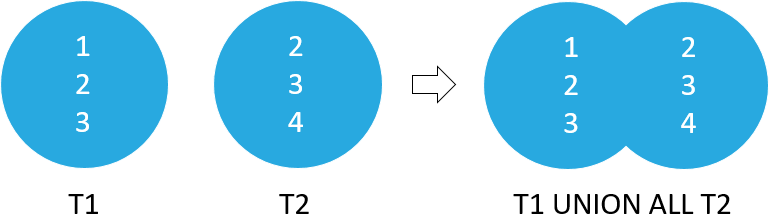
Union All
Filter out results from left query that has a match in right query
SELECT columnA FROM tableA EXCEPT SELECT columnA FROM tableB;
Return rows that are output of two queries
Note
Both data value and data type must be equal.
SELECT columnA FROM tableA INTERSECT SELECT columnB FROM tableB;
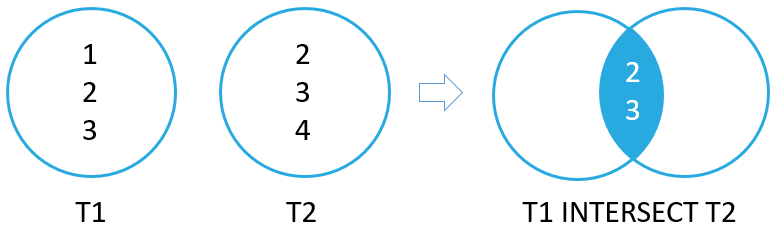
Intersect
Subqueries
Nest a SELECT statement into another …
… within WHERE
SELECT columnA, columnB
FROM tableA
WHERE columnA IN (
    SELECT columnB
    FROM tableB
    WHERE columnC = 10
);
… within FROM
SELECT columnA
FROM (
    SELECT
    SUM(columnB) SIZE
    FROM tableB
    GROUP BY some_id
) AS columnB_subset;
Check if subquery returns any result:
Zero -> False
One or more -> True
Only return row if tableB has same value in its columnA
SELECT columnA FROM tableA A WHERE EXISTS ( SELECT columnA from tableB WHERE columnA = A.columnA );
Note
Some EXISTS operations can also be done with IN, but EXISTS in faster.
Only return row if tableB does not have that value in its columnA
SELECT columnA FROM tableA A WHERE NOT EXISTS ( SELECT columnA from tableB WHERE columnA = A.columnA );
CASE … WHEN … THEN … ELSE … END
Set value ‘foo’ for columnB value, if column contains the value 1 otherwise set ‘bar’
SELECT columnA, CASE columnB WHEN '1' THEN 'foo' ELSE 'bar' FROM tableA;
Can also be used with other comparisons (set columnB to ‘little’, ‘medium’ or ‘large’ depending on its integer value)
SELECT columnA,
    CASE
        WHEN columnB < 1000 THEN ‘little’
        WHEN columnB >= 1000 AND columnB < 10000 THEN ‘medium’
        ELSE ‘large’
    END columnB
FROM tableA;
Add & Update data
Insert new data values to table
Insert single row to table
INSERT INTO tableA (columnA,columnB) VALUES(‘hello’,1);
Insert multiple rows
INSERT INTO tableA (columnA, columnB)
VALUES
    ('Hello', 1),
    ('World', 2),
    ('Here', 3),
    ('I', 4),
    ('Am', 5)
Insert default values (increment ID columns, add NULL to others)
INSERT INTO tableA DEFAULT VALUES;
Insert values provided by SELECT statement
INSERT INTO tableA_backup SELECT columnA, columnB FROM tableA;
Change column data
Update single column under condition
UPDATE tableA SET columnA = 'some value' WHERE columnB = 10;
Update multiple columns
UPDATE tableA SET columnA = 'some value', columnX = 0, columnY = 'valueA' WHERE columnB = 10;
Update using other column’s values
UPDATE tableA SET columnA = LOWER(columnB || "." || columnC || "@example.com") ORDER BY columnA LIMIT 1;
Delete data
Delete entire rows
DELETE FROM tableA WHERE columnB = 10;
Delete all rows from table
DELETE FROM tableA;
Replace rows (Delete + Add)
If no unique index column is defined for a table, a REPLACE statement will simply add the values (same as INSERT).
Define a unique index (here: columnA) -> two rows cannot have the same value for columnA
CREATE UNIQUE INDEX columnA ON tableA (columnA);
Replace single column
REPLACE INTO tableA (columnA, columnB) VALUES ('some value', 10);
REPLACE deletes the old row and inserts a new one. A primary identifier column will receive the next available id, but not the one from the deleted row.
Transaction
coming later